

Guides
Practical guideHow to withdraw from Stake
Withdraw cryptocurrency from Stake to a wallet or exchange: address, network, memo, amount, fees, confirmation and tracking.
Published by The Gambling Desk ·
To make a withdrawal, you send cryptocurrency from Stake to a personal wallet or an exchange. The process is straightforward: obtain the receiving details first, then enter them in Stake.
Before you begin
A personal wallet is an application for which you control access. An exchange is a platform that can receive, buy or sell cryptocurrencies.
Before withdrawing:
- verify the email address associated with the account;
- enable 2FA;
- open the deposit page of the service that will receive the funds;
- check that it accepts the chosen cryptocurrency and network.
The guide to Stake account security explains which safeguards to activate before sending funds.
How to withdraw funds step by step
Open the Stake Wallet and select Withdraw.
Select the cryptocurrency you want to send.
In the destination wallet or exchange, open the deposit function for the same cryptocurrency.
Choose a network supported on both sides.
Copy the receiving address and memo or tag when required.
Paste the information into Stake and enter the amount.
Review the asset, network, address, minimum, fees and net amount.
Confirm using the requested method, then track the withdrawal in the history.
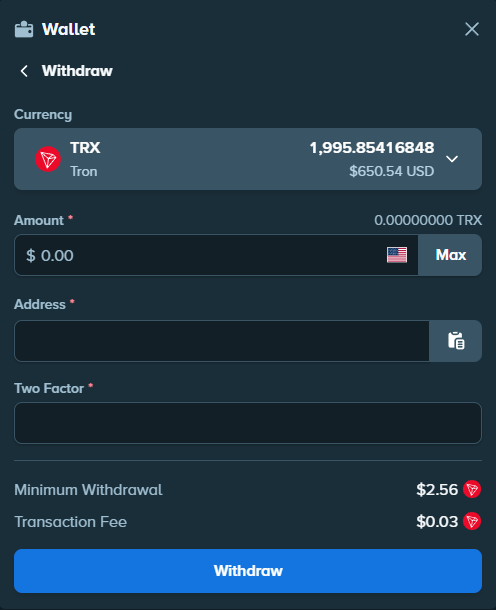
Stake states that a withdrawal has a minimum and fees deducted from the balance. These values may change: always check the summary displayed before confirming.
Where should you send cryptocurrency?
You can withdraw to a personal wallet or to the deposit address provided by an exchange such as Kraken. In both cases, the destination must accept exactly the same asset and network as Stake.
Do not reuse an old address without checking that it is still offered. If the required network does not appear on both sides, do not confirm the withdrawal.
To compare documented assets and networks, see the Stake cryptocurrency guide.
Address, network and memo: what should you check?
Stake requires additional information for some assets. EOS uses a memo and XRP a destination tag: copy this value from the receiving service whenever it appears.
A small test withdrawal can be useful for a new destination if the displayed minimum and fees allow it. It is not compulsory.
Why might the amount received be different?
The Stake form displays the minimum, fees and withdrawal amount. The receiving service may also apply its own crediting rules.
The value received or displayed may therefore differ from the amount entered. Do not rely on an old fee: the current confirmation screen is the reference.
What should you do if the withdrawal remains pending?
Stake withdrawals generally present no difficulty. The time mainly depends on the cryptocurrency and network used, but funds are most often received in under 10 minutes. This remains an indicative timeframe.
If the withdrawal seems unusually slow, check its status in the Wallet history. If necessary, then contact support through Stake's official website.
FAQ
Can you withdraw directly to Kraken?
Yes, if Kraken provides a deposit address for the same cryptocurrency and network offered by Stake.
Why does Stake ask for a code?
Depending on the account configuration, Stake may request a 2FA code, a code sent by email or renewed verification through the social service used to register.
What should you do if the networks do not match?
Do not confirm. Choose a compatible destination or return to the asset selection. Recovery after sending over the wrong network is not guaranteed.
How long does a withdrawal take?
Stake withdrawals generally present no difficulty. The time mainly depends on the cryptocurrency and network used, but funds are most often received in under 10 minutes. This timeframe is indicative and not guaranteed.
Where can you track the withdrawal?
Start with the Stake history. When a transaction identifier is available, it can also be used to track the transfer on the network explorer.