


Guided registration
How to Register on Stake
Published by The Gambling Desk ·
Create your Stake account in a few minutes and check that the tgd offer code has been entered correctly. If Stake does not open properly or you encounter a problem during registration, our Telegram assistant will guide you through the process step by step.
Step-by-step help in English or French to access Stake and complete your registration.
18+ · Check service availability in your country · Gamble responsibly.
Stake Registration Assistant
Having trouble accessing Stake or completing registration?
The Stake Registration Assistant guides you step by step in English or French according to the issue you encounter. It helps you follow the correct route without creating the account for you.
Open the Telegram assistantYou will never be asked for a password, 2FA code, recovery phrase, private key or transfer of funds.

1. Open Stake
Use the registration button on this page to open the Stake destination verified by The Gambling Desk. Check that the service is accessible and authorised where you live before continuing.
Are you in the United States?
Stake.us is a separate social casino intended for eligible users in the United States. It is distinct from the international Stake offer described in this guide. If that version applies to you, use the dedicated Stake.us offer and review the eligibility rules and conditions displayed there before registering.
2. Create your account
Enter an email address you control, choose a unique password and complete the displayed fields with accurate information. Read the conditions relating to age and use of the service, then confirm your email address.
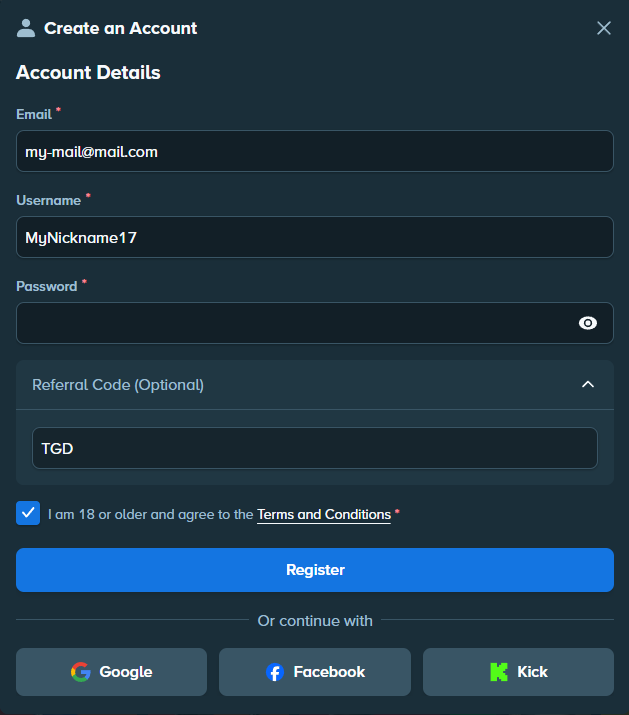
3. Check the tgd offer code
Open the Referral Code field during registration and check that tgd is displayed before confirming.
Depending on the interface displayed by Stake, the code may no longer appear at this stage and the field may be locked. If you entered tgd when creating the account, as in the previous step, you do not need to enter it again.
Have you already created your account?
Open the Offers or Welcome Offer area of your account. If the interface still allows you to add a code, enter tgd and check the conditions displayed by Stake before confirming.
tgd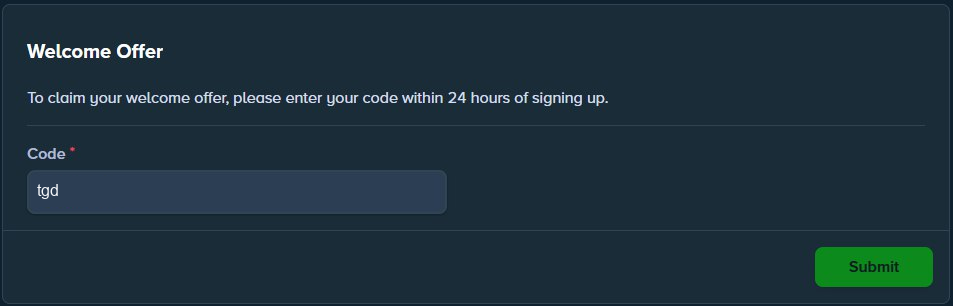
Secure the account before your first deposit
Enable two-factor authentication in the security settings and keep your recovery information somewhere other than your phone. Never share your password, a 2FA code, a recovery phrase or a private key. The Stake security guide explains this step in detail.
How do you make your first deposit?
Once your account has been created and secured, read our guide to making a first deposit. It presents the main available methods, buying cryptocurrency from Stake, and useful tutorials in French and English.
Frequently asked questions
How long does it take to create a Stake account?
The form generally takes a few minutes. Email confirmation and any additional checks may take longer.
Which offer code should you enter?
Use the code **tgd** and check that it appears correctly before submitting the form.
Can I add the tgd code after registering?
That depends on the interface and time limit shown in the Offers or Welcome Offer area. Check the available options directly in your account.
Is 2FA necessary before making a deposit?
Enabling 2FA before depositing is strongly recommended so that the account is protected from the moment it is created.
Can the Telegram assistant create the account for me?
No. It helps you access Stake and follow the registration steps according to the problem you encounter. You retain control of the browser and the account.
What information should never be shared?
Never share your password, 2FA codes, recovery phrase, private keys or a code received by email.
Ready to begin?