Crypto and payments
Practical guideHow to Deposit on Stake Easily
First Stake deposit: buy directly with Swapped or MoonPay, or use Kraken and send crypto over the correct network.
Published by The Gambling Desk ·
There are two straightforward ways to add funds to Stake. The most direct is to buy cryptocurrency from the Stake Wallet using Swapped or MoonPay. If you prefer to make the purchase separately, use Kraken and then send the cryptocurrency to the address displayed by Stake.
The easiest option for a first deposit
Route 1 · Direct purchase
- Open the Stake Wallet and select “Buy Crypto”.
- Select the cryptocurrency, amount and payment currency.
- Choose Swapped or MoonPay from the displayed offers.
- Complete payment on the provider's secure page.
Swapped
Third-party provider offered when the country, payment and cryptocurrency combination is available.
MoonPay
Third-party provider that requires identity verification and displays the available payment methods.
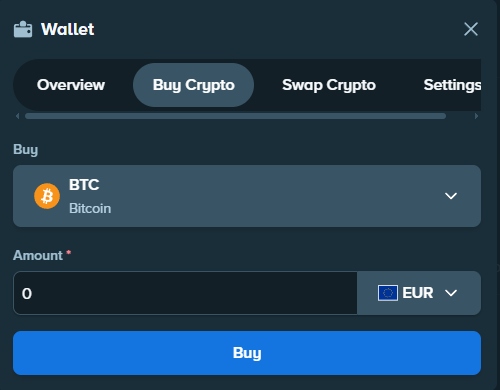
This option depends on the country, currency, payment method, asset and the provider's checks. If no provider appears, use the Kraken route instead.
Buying cryptocurrency with Kraken
An exchange is a platform that lets you buy and sell cryptocurrencies using different payment methods. Here, Kraken provides a straightforward way to buy the asset before sending it to Stake.
Two short tutorials, in order
The videos below show how to fund Kraken and then buy cryptocurrency. They do not necessarily cover the final transfer to Stake.
Step 1 · Fund Kraken
How to fund a Kraken account quickly
External YouTube tutorial, not produced by The Gambling Desk.
Step 2 · Buy cryptocurrency
How to buy cryptocurrency on Kraken quickly
External YouTube tutorial, not produced by The Gambling Desk.
Sending cryptocurrency from Kraken to Stake
- On Stake, open Wallet, then Deposit.
- Select the cryptocurrency you want to receive.
- Select the network when more than one option is available.
- Copy the address displayed by Stake.
- In Kraken, open Withdraw and select the same cryptocurrency.
- Select exactly the same network.
- Paste the Stake address into the destination field.
- Add the memo or tag if Stake displays one.
- Check the address, network, amount, minimum and fees.
- Confirm the transfer.
A simple analogy
Think of a bank transfer: the address indicates where to send the funds, like an IBAN. The network indicates the route the transfer must follow.
The network selected on Kraken must be exactly the same as the one displayed by Stake.- Deposit address
- Recipient's IBAN
- Network
- Transfer route
- Amount
- Sum sent
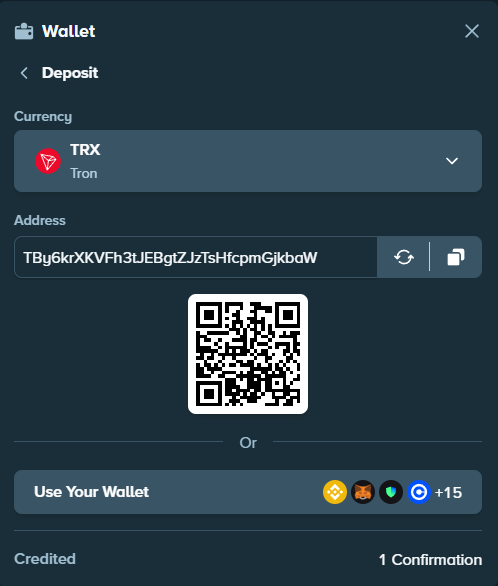
For a first transaction, a small test transfer can be useful if the displayed minimum and fees allow it. It is not mandatory.
Which cryptocurrencies can help keep fees down?
The four options below share a network officially documented by both Stake and Kraken as of 25 July 2026. Availability may nevertheless depend on the country and account.

Solana
USD Coin (USDC)
A dollar-tracking stablecoin available on Solana; use the Solana deposit address shown by Stake.
USDC also exists on other networks. Select Solana on both the sending platform and Stake.

TRON (TRC-20)
TRON (TRX)
TRON’s native asset, transferred here over the TRON (TRC-20) network.
Choose TRON (TRC-20) at both ends; TRX is the asset name, not a substitute for the network check.

Solana
Solana (SOL)
Solana’s native asset, sent directly over the Solana network.
Do not send SOL through another network or to an address not explicitly shown for Solana.

Ripple
XRP (XRP)
An asset designed for transfers over the Ripple network.
Copy both the XRP address and the destination tag displayed by Stake; omitting the tag can prevent account crediting.
Never select a network solely because it appears cheaper. The name shown on Kraken must match the network accepted by Stake.
To compare other assets and their networks, see the complete Stake cryptocurrency guide.
Can you also play with fiat currency on Stake?
Stake mainly operates around cryptocurrencies, depending on the relevant market. In certain countries or versions of Stake, users may also be able to deposit, play and withdraw using a local currency offered directly in their interface.
ARS, CLP, CAD, VND, INR and TRY make up the fiat snapshot retained by the project. This list is informative, non-exhaustive and subject to change. Availability notably depends on the country, account, version of Stake and local conditions.
This feature is separate from buying cryptocurrency with MoonPay or Swapped. The account interface remains the only reference: if a local currency is available, the relevant user will find it directly in their Wallet.
Checks to make before sending
- Asset: the cryptocurrency withdrawn from Kraken must be the one selected on Stake.
- Network: both screens must display the same network.
- Address: copy it from Stake and compare the first and last characters.
- Memo or tag: add it whenever Stake displays one, particularly for XRP.
- Minimum amount: check it on both platforms.
- Fees: Kraken displays the withdrawal cost before confirmation.
- Availability: a recent purchase by card or digital wallet on Kraken may trigger a temporary withdrawal hold.
Using the wrong network can prevent the funds from being credited, and their recovery is not guaranteed. If in doubt, do not confirm the transaction.
FAQ
What is the easiest method for a first deposit on Stake?
Open the Stake Wallet, then Buy Crypto. If Swapped or MoonPay is available for your country, currency and selected cryptocurrency, you can make the purchase without first preparing an external withdrawal address.
Is Kraken required to deposit on Stake?
No. Kraken is one possible solution when you want to buy cryptocurrency separately. You can also use the direct-purchase option displayed by Stake or send cryptocurrency you already own from a compatible service.
What are the address and network used for?
The address identifies the destination account. The network identifies the technical route used for the transfer. Both must match the information displayed by Stake.
What happens if the wrong network is used?
Stake states that an asset sent over an unsupported network will not be credited. Recovery is not automatic and may be impossible.
How long does a deposit take?
There is no guaranteed processing time. It depends on the network, its confirmations and the platform's checks.
Why might the amount received be lower?
Kraken displays a withdrawal fee and minimum before the transfer. Their values vary by asset and network; always check the current summary.
Once the transfer has been confirmed, track its status in your Kraken activity and then in your Stake Wallet history.