




Choose a personal wallet or an exchange such as Kraken to receive your crypto. Open its deposit page and check that it accepts the same asset and network offered by Stake. If it does not, choose another compatible destination.
Before withdrawing, check your account email and review the protections available in security settings.
Withdraw your funds
Open the Stake Wallet and select Withdraw.
Select the cryptocurrency you want to send.
In the destination wallet or exchange, open the deposit function for the same cryptocurrency.
Choose a network supported on both sides.
Copy the receiving address and memo or tag when required.
Paste the information into Stake and enter the amount.
Review the asset, network, address, minimum, fees and net amount.
Confirm using the requested method, then track the withdrawal in the history.
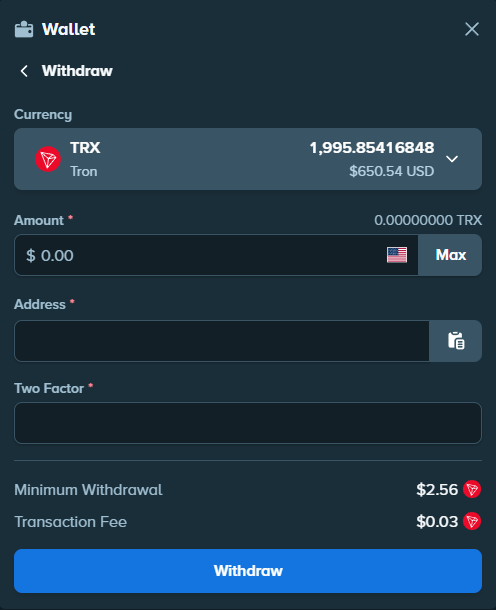
Depending on your account setup, Stake may request a 2FA code, an email code or verification through the social service used at registration.
Check the address, network and memo
Copy the current deposit address from the receiving service. EOS uses a memo and XRP a destination tag: include the value supplied by the recipient whenever it appears. If the networks do not match, do not confirm; recovery after using the wrong network is not guaranteed.
A small test withdrawal can be useful for a new destination if the displayed minimum and fees allow it. It is not required. The receiving service may also apply its own crediting rules.
Follow your withdrawal
Timing depends on Stake’s processing, the network and confirmations required by the recipient. Approval by Stake does not mean an exchange will credit the transfer immediately.
Check your Wallet history. When a transaction ID is available, use it in the network explorer to see whether the transfer is awaiting confirmations. If the delay seems unusual, contact the service responsible for that stage with the transaction ID.