
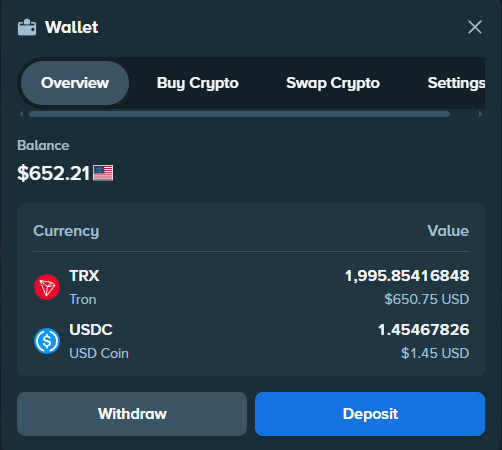


Open the Stake Wallet to buy crypto directly or prepare a transfer from another service. Available options depend on your country, currency, payment method, asset and the provider’s checks.
Buy directly through the Stake Wallet
Route 1 · Direct purchase
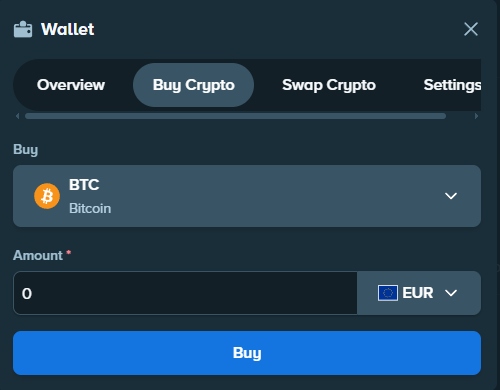
- Open the Stake Wallet and select “Buy Crypto”.
- Select the cryptocurrency, amount and payment currency.
- Choose Swapped or MoonPay from the displayed offers.
- Complete payment on the provider's secure page.
Swapped
Third-party provider offered when the country, payment and cryptocurrency combination is available.
MoonPay
Third-party provider that requires identity verification and displays the available payment methods.
If no provider appears, you can buy crypto separately and transfer it from a compatible service such as Kraken.
Buy crypto on Kraken
Kraken is an exchange: a separate platform for buying and selling crypto. The steps and videos below show how to fund your account and buy crypto before sending it to Stake.
Step 1 · Fund Kraken
How to fund a Kraken account quickly
External YouTube tutorial, not produced by The Gambling Desk.
Step 2 · Buy cryptocurrency
How to buy cryptocurrency on Kraken quickly
External YouTube tutorial, not produced by The Gambling Desk.
Transfer crypto to Stake
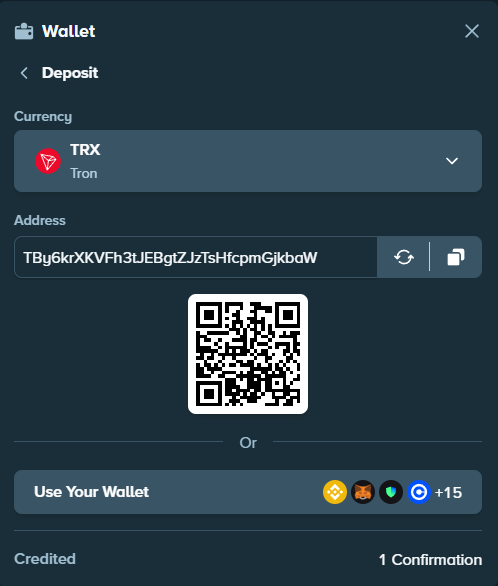
- On Stake, open Wallet, then Deposit, and select the crypto you want to receive.
- Select the network if several are offered, and copy the address shown by Stake.
- In Kraken, open Withdraw and choose the same crypto and exactly the same network.
- Paste the Stake address into the destination field. Add the memo or tag if Stake shows one.
- Check the address, network, amount, minimum and fees before confirming the transfer.
A simple analogy
Think of a bank transfer: the address indicates where to send the funds, like an IBAN. The network indicates the route the transfer must follow.
The network selected on Kraken must be exactly the same as the one displayed by Stake.- Deposit address
- Recipient's IBAN
- Network
- Transfer route
- Amount
- Sum sent
Compare the first and last characters of the copied address. Check the minimum on both platforms; Kraken displays its withdrawal fee before confirmation. A recent card or digital-wallet purchase on Kraken can trigger a temporary withdrawal hold.
Using an unsupported network can prevent a deposit from being credited, and recovery is not guaranteed. If in doubt, do not confirm. A small test transfer can be useful for a new destination if the minimum and fees allow it; it is not required.
Choose a crypto and network
The four options below have a shared network documented by Stake and Kraken as of 25 July 2026. Availability may depend on your country and account. Select the same asset and network on both services, and check the current fee before sending.

Solana
USD Coin (USDC)
A stablecoin designed to track the dollar, available on several networks.
Read the full network name: the USDC ticker alone is not enough.

TRON (TRC-20)
TRON (TRX)
The TRON network’s native asset, handy for a straightforward transfer.
TRX is the asset; TRC-20 is the network to select.

Solana
Solana (SOL)
The native asset of a generally fast, low-cost network.
Transfer times and fees still vary.

Ripple
XRP (XRP)
An asset designed for transfers, with a network supported by both Stake and Kraken.
Also copy the destination tag displayed by Stake.
Local currencies
In some countries or versions of Stake, users can also deposit, play and withdraw using a local currency offered in the Wallet.
The Wallet shows what is offered for your country and account. Buying crypto with MoonPay or Swapped follows the purchase route above.
If your deposit has not arrived
Check the withdrawal status on the sending service. If complete, use the transaction ID to check the network explorer, then check your Stake Wallet history. A transfer awaiting confirmations is not necessarily lost.
If the asset, network or memo does not match Stake’s instructions, do not send another transfer as a test. Keep the transaction ID and contact official support with the exact details.